
21.06.2026
Workflow for digital company presentation: guide 2026
Find out how to optimize your workflow for your company's digital presentation. Become more efficient and measurable in your digital presence.
Workflow for a Company's Digital Presence: Guide 2026
In brief:
- An effective digital presence workflow connects marketing, IT, and content teams into a coordinated process. The system enables planned management, publication, and promotion of content while improving company efficiency. It includes automation, tool integration, and performance measurement to build a recognizable digital presence.
A workflow for a company's digital presence is a systematic process that enables businesses to plan, manage, publish, and promote digital content across all channels simultaneously. In professional terminology, we speak of a workflow management system that connects marketing, IT, and content teams into a single coordinated process. Without such a system, any company operating online risks inconsistent messaging, publication delays, and lost traffic. Tools such as Microsoft Azure, Waidok, and SEO diagnostic tools are now the foundation of every functional workflow. Once you establish a clear workflow, your company's digital presence becomes predictable and measurable rather than dependent on the random decisions of individuals.
What are the basic components of a workflow for a company's digital presence?
An effective workflow for digital solutions consists of four interconnected components: content capture, editing, publishing, and performance measurement. Each component has its role, and without any one of them, the entire system collapses.

Content creation and editing is the starting point of every workflow. This includes writing copy, taking photographs, designing graphics, and producing videos. Companies that do not structure this process often discover that content is created randomly and without a consistent visual identity. A tool such as Waidok enables automated processing of documents and content while routing them to the right people within the team. This means the editorial process moves faster and requires fewer manual interventions.
Publishing and distribution are the next step. This includes scheduling content on websites, in email campaigns, and across social media channels. Content management systems such as WordPress or Contentful, together with publishing tools such as Buffer, ensure that content reaches the right audience at the right time. Without this step, even the best content remains unnoticed.
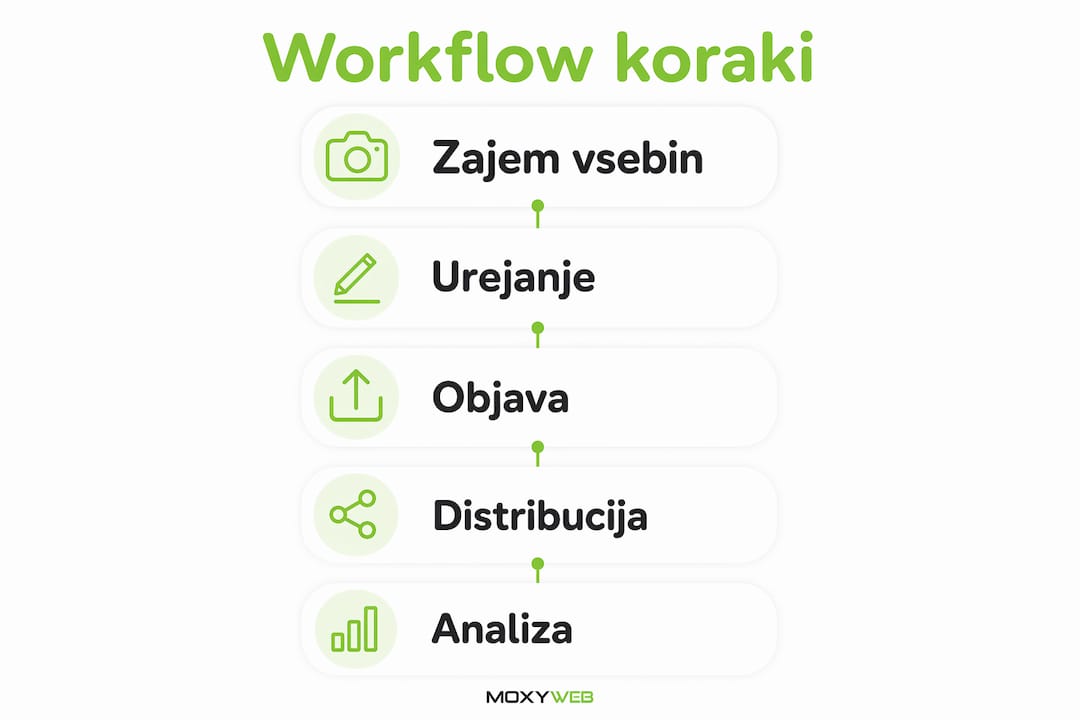
Measurement and analytics close the loop. Google Analytics 4, Google Search Console, and conversion-tracking tools show you which content performs well and which does not. Without this information, you cannot make decisions based on facts.
Key technological components that every workflow for a company's digital presence requires:
- Cloud infrastructure: Cloud solutions such as Microsoft Azure provide 24/7 access and reduce IT infrastructure maintenance costs. This is particularly important for small and medium-sized businesses that cannot maintain their own servers.
- Document and content systems: Waidok and similar tools automate document routing and reduce manual errors in content processing.
- SEO tools: Tools such as Semrush, Ahrefs, or Google Search Console ensure that the right searchers can find your content.
- Visual identity tools: Canva Pro or Adobe Express enable the rapid creation of graphic materials while maintaining a consistent brand identity.
- System integrations: Zapier or Make (formerly Integromat) connect different tools so that data flows automatically without manual transfer.
Workflows are based on the integration of various digital tools and require coordinated collaboration between marketing, IT, and other departments. This is not only a technical task but also an organizational one.
How to establish an effective workflow for a digital presence: steps and recommendations
Establishing a functional workflow management system requires a structured approach. Rushing into tools without prior planning is the most common reason for failure.
-
Define goals and digital channels. Before selecting any tool, answer the question: what exactly do you want to achieve? More website traffic, more inquiries, stronger brand awareness? Each goal requires a different set of channels and processes. A company targeting B2B customers will emphasize LinkedIn and email marketing. A company selling to consumers will focus on Instagram and Google Ads.
-
Select and configure tools. Once you know your goals, choose tools that support them. Microsoft Azure is suitable for companies that require reliable cloud infrastructure and secure data storage. Waidok is suitable for automating document processes. For SEO diagnostics, Semrush and Google Search Console are standard choices. Do not choose tools because they are popular, but because they solve your specific problem.
-
Establish processes for publication automation. Define who in the team is responsible for each step: who writes the content, who edits it, who approves publication, and who measures results. This allocation of responsibility prevents situations where content waits weeks for approval. Tools such as Trello or Asana help visualize these steps and track progress.
-
Test before full implementation. Before launching the entire workflow in production, test it on a smaller scale. Publish ten pieces of content through the new system and identify where bottlenecks occur. You may find that the editorial step takes too long or that integrations between tools do not work as expected.
-
Measure performance and adapt. A workflow is not a static document. Every month, review key metrics: time from idea to publication, number of publishing errors, traffic, and conversions. Use this data to refine your processes.
Expert tip: Start with a minimal workflow that covers only one channel. Once it operates reliably, add the next channel. Companies that try to cover all channels at once often fail to manage any of them effectively.
Rapid implementation of digital solutions is possible through cloud systems that do not require lengthy deployment processes. This means that small and medium-sized businesses can establish a functional workflow in weeks rather than months.
How does a workflow increase efficiency and improve a company's digital presence?
Implementing a structured workflow has measurable effects on a company's day-to-day operations. Workflow automation significantly improves operational efficiency and reduces process errors. This is not merely a theory, but an experience confirmed by companies that have transitioned from manual to automated processes.
Reducing manual errors and bottlenecks is the first and most important benefit. When content moves through manual processes, errors accumulate: the wrong image is published, an outdated price remains on the website, or a message is not aligned with the current campaign. An automated workflow eliminates these mistakes because each step follows predefined rules. A company that previously spent an hour manually uploading content to three different platforms can now complete the same task in five minutes with a single click.
A consistent visual identity and aligned messaging are direct outcomes of a structured process. When every employee has access to the same library of graphic assets and approved copy templates, the likelihood of inconsistent publications is minimal. This is especially critical for companies with multiple employees communicating with the public.
Faster response to market changes is the third benefit. A company with a functional workflow can publish a response to industry developments within 24 hours. A company without one may require a week of coordination for the same task. In the digital environment, speed is often a decisive advantage.
“A digital presence without a clear strategy is merely noise that harms a company rather than helping it.”
This observation applies to every company, regardless of size. A workflow without a strategy is simply a faster way to publish the wrong content. Strategy and workflow must work together.
Artificial intelligence increases productivity and creativity in digital marketing. Tools such as ChatGPT, Jasper, and Midjourney are now part of the workflows of advanced marketing teams. They accelerate content creation and make it possible to test a larger number of messages in a shorter period of time.
Cloud solutions add another dimension to workflows: web application scalability means that the system operates just as reliably whether you have three employees or thirty. Microsoft Azure, for example, automatically adjusts capacity according to demand, meaning you do not need to worry about infrastructure during traffic peaks.
What are the common mistakes when implementing a workflow, and how can they be prevented?
Mistakes in workflow implementation are predictable. Most companies make the same mistakes, which can be avoided with a little advance planning.
-
Implementing too quickly without a strategy. A digital presence without a clear market position harms a company. Before establishing a workflow, you must know who you are communicating with, what you are communicating, and why. A company that begins publishing content without this knowledge quickly discovers that, despite regular posting, it is not gaining new customers.
-
Excessive technological complexity. Some companies choose too many tools at once and then fail to use them. The result is an expensive ecosystem that no one fully understands. Start with two or three tools that your team can actually master.
-
Ignoring user needs. A workflow designed without considering how employees actually work will be rejected. Before introducing a new system, talk to your team and understand their work habits.
-
Skipping testing. Rushing the implementation of technological solutions without clearly defined processes often leads to inefficiencies and additional costs. Test every new workflow step on a smaller scale before rolling it out to the entire team.
-
Neglecting data security. A workflow that includes sensitive customer information or business secrets must be secured. Cloud solutions with built-in security protocols, such as those provided by Microsoft Azure, offer an advantage over local systems.
Expert tip: Assign one person to be responsible for each part of the workflow. When responsibility is shared among everyone, no one is truly accountable. A single process owner ensures that errors are identified and resolved quickly.
The hidden costs of process inefficiency often exceed the cost of the technology itself. This means that delaying workflow implementation is actually more expensive than investing in the system. Every week without a structured process is a week of lost time and missed opportunities.
Companies that avoid these mistakes achieve a functional workflow faster and at lower cost. The key is a gradual approach: first strategy, then tools, then automation.
Key Takeaways
An effective workflow for a company's digital presence requires a clear strategy, the right selection of tools, and gradual implementation supported by performance measurement at every stage.
| Point |
Details |
| Strategy before tools |
Define your goals and target audience before selecting any technology. |
| Cloud infrastructure |
Microsoft Azure and similar solutions provide 24/7 access and reduce IT costs. |
| Gradual implementation |
Start with one channel and expand the workflow only after it operates reliably. |
| Performance measurement |
Google Analytics 4 and Search Console are the foundation for data-driven decision-making. |
| Team accountability |
Every workflow step should have a designated process owner. |
Why a workflow is not just an IT project, but a business foundation
When I first implemented a digital workflow for a client in the service sector, we made a classic mistake: we started with the tools. We purchased a Waidok license, set up a Microsoft Azure environment, and integrated three different platforms. The system was technically flawless. Yet after two months, the team was still publishing content manually because no one understood why the new system was better than the old one.
The lesson was clear: a workflow is first an organizational change and only then a technical one. When we returned to the beginning and worked with the team to define which tasks consumed the most time, the picture changed. It turned out that content approval took an average of five days because it was passed through four people via email. Once we moved this step into Waidok with clearly defined roles, the approval time was reduced to a single day.
Another factor that is often underestimated is the role of the digital strategy for company growth. A workflow without a strategy is like a highway without a destination. You move quickly, but you do not know where you are going. Companies that first define who they are communicating with and why achieve better results with simpler workflows than companies using complex systems without a clear purpose.
A third observation from practice: small businesses do not need complex systems. A simple workflow that the team actually uses is more valuable than a sophisticated system that gathers dust. For a company with five employees, Trello for content management, Google Drive for storage, and Buffer for scheduling posts are often sufficient. As the company grows, the workflow grows with it.
What surprised me while working with different companies is how often marketing and IT departments operate in silos. Marketing creates content, IT maintains systems, but no one talks about how these two functions could work together to create a better workflow. Once that communication begins, efficiency increases noticeably and quickly.
— Ziga
Moxy-web: Your Partner for Establishing a Digital Workflow
Establishing an effective workflow for a company's digital presence requires expertise that most companies do not have in-house. Moxy-web offers comprehensive web development services that include planning and implementing digital processes tailored to your business goals. From website development to integration with external systems, the Moxy-web team ensures that your digital presence functions as a coordinated system. Every project is based on an individual approach and the use of proven technologies. If you want to establish a workflow that presents your company professionally and effectively, explore Moxy-web solutions and take the first step toward a structured digital presence.
Frequently Asked Questions
What is a workflow for a company's digital presence?
A workflow for a company's digital presence is a structured process that defines how a company plans, creates, publishes, and measures digital content. It includes tools, responsibilities, and processes that ensure coordinated and effective digital communication.
Which tools are most suitable for a digital workflow?
For cloud infrastructure, Microsoft Azure is a standard choice; for document automation, Waidok; for SEO diagnostics, Google Search Console or Semrush; and for content scheduling, Buffer or Hootsuite. Tool selection should follow business objectives, not popularity.
How long does it take to establish a functional workflow?
Small businesses with a clear strategy and two or three tools can establish a functional workflow within 2–4 weeks. Larger companies with multiple channels and employees typically require 2–3 months for full implementation and testing.
Is a workflow suitable for small businesses?
A workflow is suitable for businesses of all sizes. Small businesses even have an advantage because their processes are shorter and easier to structure. A simple system that the team actually uses can deliver measurable results within the first month.
How can I prevent a workflow from becoming too complex?
Start with the minimum number of tools and steps required to solve your biggest problem. Add each new tool or step only after the existing part of the workflow is operating reliably. Introduce complexity gradually, not at the beginning.
Recommended